


Monitor qibb in Datadog with our new observability integration

When a business-critical media workflow slows down or fails, operations teams need to understand what happened across every connected system, not just within a single platform.
Today, we are introducing the beta release of the qibb Datadog Observability Integration. It streams qibb application logs and performance metrics into your Datadog environment, helping teams detect issues sooner, investigate them with more context, and restore operations faster.
For enterprise customers, this means qibb can become part of an established observability strategy. Teams can monitor qibb alongside their wider application and infrastructure ecosystem, using the tools and processes they already rely on.
Why external observability matters
Media workflows increasingly connect cloud infrastructure, third-party services, internal systems, and qibb applications. When something goes wrong, the cause may sit anywhere across that chain.
Looking at each system separately makes incidents harder and slower to resolve. It can also create fragmented monitoring processes, with different dashboards, alerts, retention policies, and responsibilities for every platform.
The Datadog Observability Integration helps remove that fragmentation by bringing qibb telemetry into a shared operational view.
For qibb users, this provides faster access to the information needed to troubleshoot workflow issues. For IT and operations teams, it means qibb can be monitored using their existing dashboards, alerts, and incident-response processes. For enterprise buyers, it makes adopting qibb easier without requiring a separate observability approach.
Bring qibb telemetry into your existing environment
The integration automatically collects telemetry from deployed qibb apps and streams it to a customer’s Datadog account in near real time.
Application logs can include:
- Error, warning, information, debug, and optional audit logs
- Flow run output that shows the execution sequence of a workflow
- Job events generated by workflow checkpoints
The integration also provides runtime and performance metrics, including CPU and memory usage. Depending on the configuration, customers can monitor additional signals such as container restarts, resource limits, request volumes, response codes, and request-processing duration.
qibb-specific attributes make it possible to filter and analyze data by app, space, cluster, container, flow, node, run, or job. This gives teams the context they need to move from a high-level alert to the affected part of a workflow.
Find and resolve issues faster
By combining qibb telemetry with data from connected services and infrastructure, teams can investigate an incident in its wider operational context.
This can help organizations:
- Detect performance problems and application failures sooner
- Identify the affected app, flow, run, job, or node
- Correlate qibb activity with events in connected systems
- Reduce the time spent switching between monitoring tools
- Find root causes faster and minimize workflow disruption
- Maintain a consolidated view of application and infrastructure health
Instead of treating qibb as a separate monitoring domain, operations teams can include it in the same workflows they use to manage the rest of their technology environment.
Use your existing operational processes
Enterprise customers should not have to create a separate monitoring process for qibb.
Once the telemetry reaches Datadog, customers can use their own dashboards, monitors, alerts, retention policies, and analytics. This helps organizations apply established operational, security, and governance practices to qibb alongside their other systems.
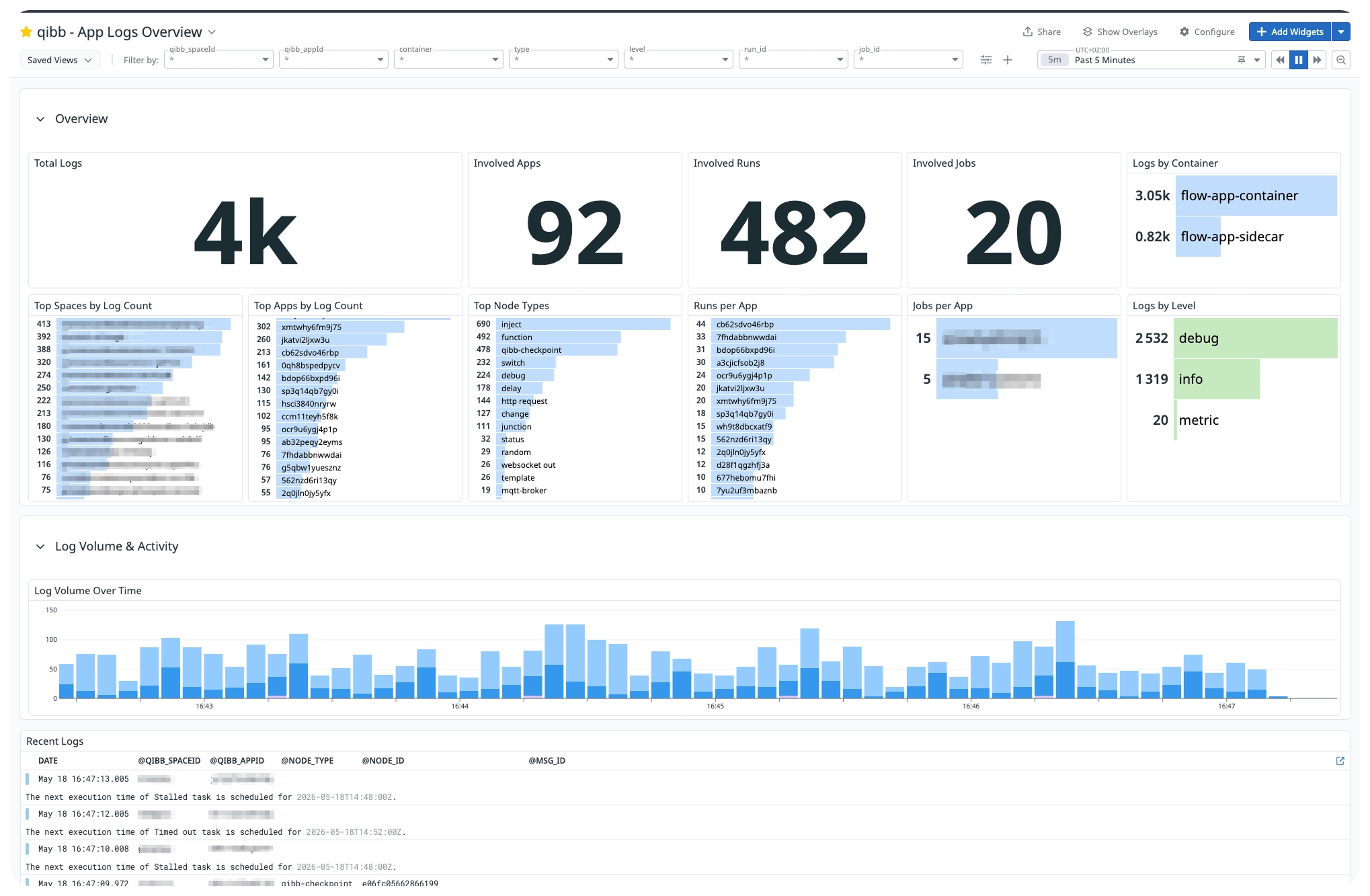
qibb provides telemetry streaming and an example dashboard that customers can import as a starting point. The example dashboard summarizes log volume, apps, runs, and jobs, with breakdowns by space, container, node, and log level. Customers remain responsible for configuring and managing their Datadog resources based on their own requirements.
Because the integration operates at the platform level, teams do not need to build and maintain a separate telemetry pipeline for every deployed qibb app. qibb collects the relevant monitoring data and sends it to Datadog automatically.
Built for enterprise flexibility
Different organizations have different observability strategies. Some need centralized monitoring across business units. Others must follow specific policies for alerting, data retention, access, or incident management.
The Datadog integration gives enterprise customers greater flexibility to fit qibb into those existing structures. It helps reduce operational silos while allowing each organization to decide how its observability data is visualized, analyzed, retained, and acted upon.
Datadog usage and associated costs depend on factors such as the number of qibb apps, enabled metrics, log volume, and customer configuration. These costs are billed directly by Datadog.
Datadog is the first step
Datadog is our first external observability integration, but it will not be the last.
We know that enterprise customers use a range of monitoring and analytics platforms. We are exploring support for additional destinations, including Splunk, as we continue developing qibb’s external observability capabilities.
Feedback from customers participating in the beta will help us refine the experience and prioritize future integrations.
Availability
The qibb Datadog Observability Integration is currently available in beta as a subscription add-on for qibb Ultimate customers. Additional charges may apply.
To discuss enabling the integration for your environment, contact the qibb team. For supported telemetry, example dashboards, configuration details, and usage guidance, visit the Datadog Observability Integration documentation.

qibb today


Monitor qibb in Datadog with our new observability integration

New in qibb: GitOps and more flexible Secret Management for Flows
Gain deeper insight into workflow execution with qibb AI Copilot
Five practical ways to build, operate, and improve workflow orchestration with qibb AI Copilot.
Build more resilient flow apps with runtime monitoring and app sizing
Introducing qibb's AI copilot: Your new intelligent partner for media workflow orchestration