


New in qibb: GitOps and more flexible Secret Management for Flows

Enterprise teams already rely on established tools to manage source code, deployments, and sensitive credentials. Introducing a new automation platform should not require them to replace those tools or create parallel operational processes.
qibb is built to fit into the technology landscape organizations already have. That means helping teams use Git as their source of truth, connect to their existing secret management systems, and apply familiar security practices to their flows.
Today, we’re introducing three capabilities that support this approach: the GitOps Plugin, the Secret Manager Plugin, and the new AWS Secret Manager Node.
The two plugins address requests we have heard from enterprise customers for more automated flow synchronization and simpler credential management. The AWS Secret Manager Node extends this story by allowing organizations to use secrets stored in an existing AWS environment.
Together, these additions help teams keep deployed flows consistent, provide them with the credentials they need, and reduce the manual work involved in operating flows across multiple environments.
Reduce configuration drift with automated Git synchronization
For many development teams, Git is the central source of truth for application configurations. Maintaining a repository, however, is only part of the process. Teams must also ensure that deployed applications remain aligned with the correct branch and receive updates reliably.
The new GitOps Plugin brings this process directly into qibb.
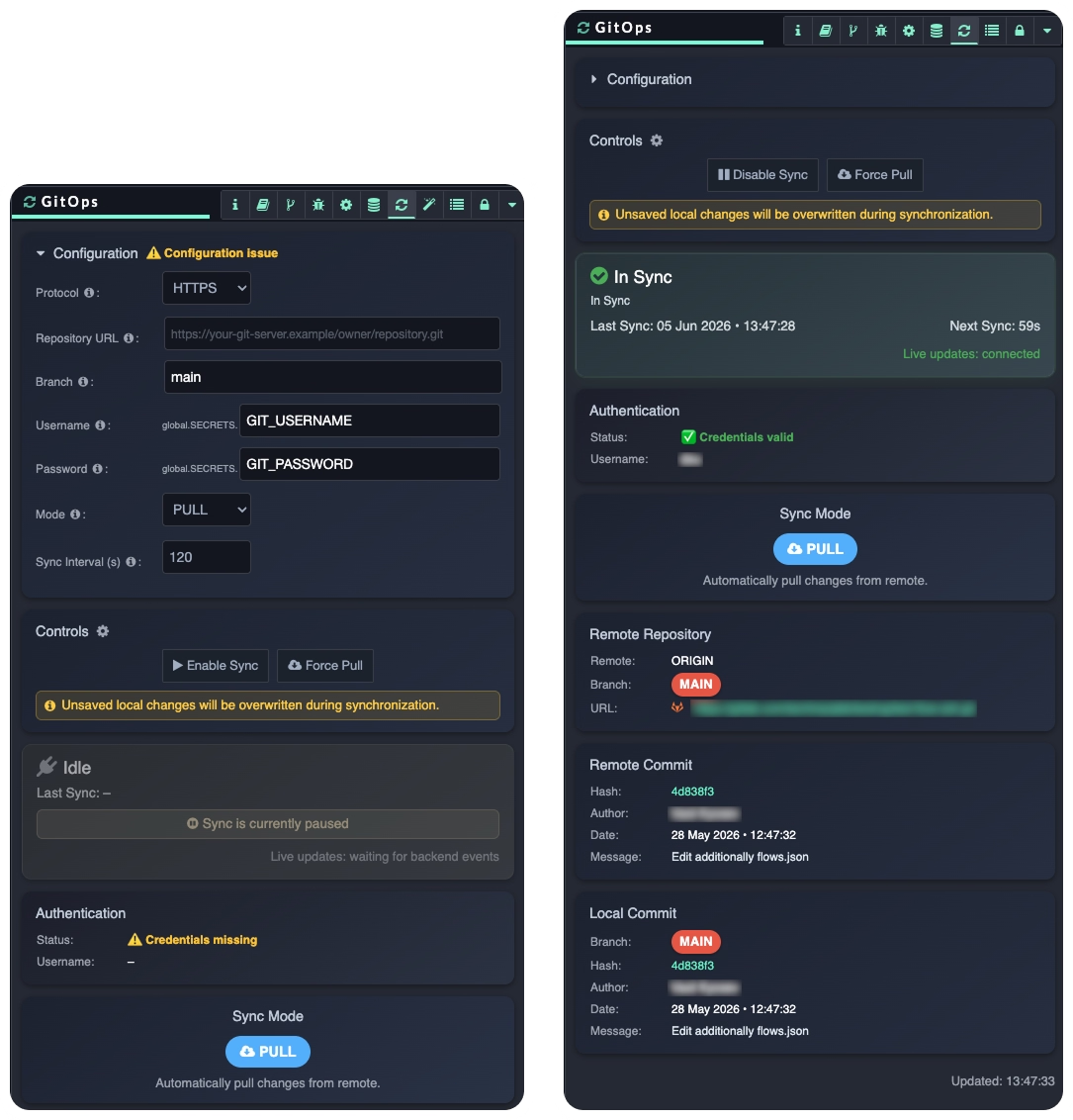
Operating in PULL mode, the plugin periodically checks a configured remote Git branch and automatically applies new changes to the running Flow App.
Synchronization happens in the background, helping teams keep deployed flows aligned with the version maintained in Git without relying on repetitive manual updates.
This reduces the risk of configuration drift between the repository and the running application. It also makes it easier to apply consistent, Git-based operational practices across multiple Flow App environments.
Developers can monitor the synchronization state directly from the Flow Editor sidebar, including local and remote commit information. They can also pause or resume synchronization and trigger an immediate pull whenever required.
Help recover missing dependencies
A flow update can introduce nodes or packages that are not yet installed in the target environment. Without the correct dependencies, parts of the flow may appear as unknown nodes or fail to work as intended.
When the GitOps Plugin pulls an update, it checks the project’s package.json and scans the incoming flow for missing node types. Declared dependencies can be installed automatically. The plugin can also cross-reference unknown nodes with qibb’s system catalog and install a matching package when one is available.
This recovery process can reduce the work required to prepare each environment and help teams resolve common dependency differences automatically. For reliable recovery, third-party nodes should be explicitly added to the project dependencies. Custom or unpublished nodes, version conflicts, and unsuccessful package installations may still require manual resolution.
The plugin also supports HTTPS and SSH connections, configurable synchronization intervals, manual synchronization controls, and Git authentication using credentials stored in qibb’s Secret Manager.
Learn how to configure the GitOps Plugin for flows.
Give flows secure access to credentials without maintaining a node
Credentials, API keys, and access tokens are essential to many integrations, but managing them directly inside application logic creates unnecessary security and maintenance risks.
The new Secret Manager Plugin provides a dedicated sidebar interface for synchronizing Flow Apps with qibb’s Secret Manager. It replaces the legacy qibb Secret Manager node in Flow App version 5.3.0 and later, removing the need to add and maintain a dedicated node in every flow.
Once synchronized, secrets belonging to the Flow App’s space are exposed through the flow’s global context. Developers can reference them using a standard path such as: global.SECRETS.my_api_token
This keeps sensitive values separate from the flow definition while making them available to the nodes that need them. Because access is restricted to secrets from the space in which the Flow App is deployed, teams can manage credentials on a per-space basis.
Verify secret availability without exposing sensitive values
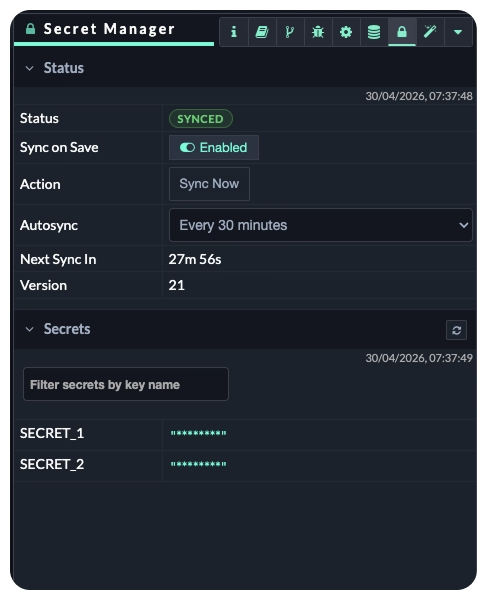
The Secret Manager sidebar provides a read-only view of the secret keys currently available to the Flow App. Developers can search for a key and confirm that a required credential has been synchronized without revealing its value on screen.
Teams can choose to synchronize secrets whenever a flow is saved, trigger a synchronization manually, or configure an automatic synchronization interval.
This gives developers greater visibility and control while helping organizations maintain a clear separation between application logic and sensitive configuration.
Learn more about the Secret Manager Plugin for flows.
Bring your existing AWS secrets into qibb flows
Not every organization wants to move its credentials into another secret management system. Many enterprise teams already use AWS Secrets Manager as part of their cloud operations.
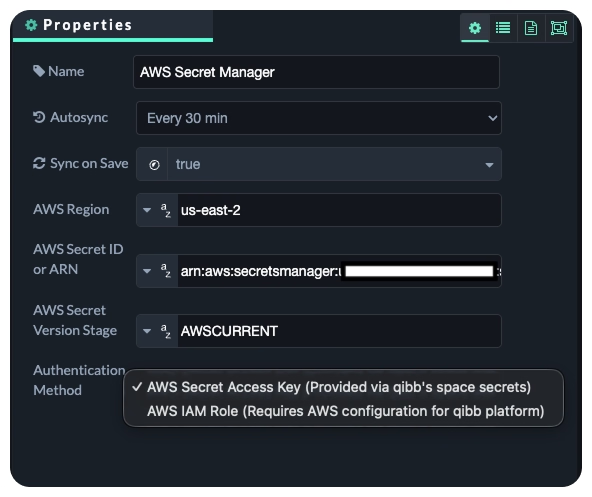
The new AWS Secret Manager Node allows those teams to retrieve a configured secret from AWS Secrets Manager and make it available throughout a qibb flow.
After a successful synchronization, the secret is stored in the flow’s global context under AWS_SECRETS, with additional information available under AWS_SECRETS_METADATA. If the AWS secret contains valid JSON, it is parsed into a JavaScript object. Plain-text secrets are stored as strings.
The node can synchronize the secret after a flow is saved or deployed and refresh it periodically using a configurable interval. If synchronization fails, it retries automatically. After five consecutive failed attempts, the retries stop and the node reports an error status.
Authentication can use an AWS access key stored in qibb’s Secret Manager. For customers with an Ultimate subscription, the node can also use an AWS IAM role or equivalent workload identity assigned to the qibb runtime. This option requires the underlying infrastructure and AWS permissions to be configured appropriately, but it does not require an AWS access key.
For organizations already using AWS Secrets Manager, the value is straightforward. They can continue managing secrets within an established AWS environment and make those secrets available to qibb flows through a dedicated node.
Learn how to configure the AWS Secret Manager Node.
Designed to fit your enterprise toolchain
These capabilities give organizations greater flexibility in how they operate and secure their flows.
The GitOps Plugin keeps deployed flow definitions aligned with a remote Git repository and can help recover required dependencies. The qibb Secret Manager Plugin synchronizes space-specific secrets into Flow Apps. The AWS Secret Manager Node provides an additional option for retrieving a secret from AWS Secrets Manager.
For developers, this means fewer manual synchronization tasks and easier access to the credentials their flows require. For platform teams, it means greater consistency across Flow App environments and the ability to work with existing Git and secret management practices. For buyers and organizations, it means adopting qibb without having to replace established enterprise tools or create unnecessary parallel processes.
Available now
The GitOps and Secret Manager Plugins are available as beta features for Flow Apps running version 5.3.0 or later.

qibb today


Monitor qibb in Datadog with our new observability integration

New in qibb: GitOps and more flexible Secret Management for Flows
Gain deeper insight into workflow execution with qibb AI Copilot
Five practical ways to build, operate, and improve workflow orchestration with qibb AI Copilot.
Build more resilient flow apps with runtime monitoring and app sizing
Introducing qibb's AI copilot: Your new intelligent partner for media workflow orchestration