


Low-code, no-code, or custom development: what works best for your media workflows?

Media workflows do not stay still for long.
New distribution channels appear. Metadata requirements change. AI services are added. Review processes shift. Storage systems move. Customers ask for new formats. A live sports workflow may look nothing like an archive workflow, and a highlights pipeline will have very different needs from long-form production.
That constant change creates a familiar challenge: how do you build workflow technology that is flexible enough for media operations without turning every update into a custom development project?
For many broadcasters, streaming platforms, sports organizations, and media service providers, the choice often comes down to three options: no-code tools, custom development, or low-code workflow orchestration.
Each has a role. But for complex media supply chains, low-code often gives teams the best balance of speed, control, and adaptability.
Understanding no-code, low-code, and custom development
No-code tools are designed to help users build simple automations without writing code. They can be useful for lightweight tasks, basic app-to-app connections, or internal productivity workflows.
Custom development, sometimes called high-code development, gives teams full control. Developers can build highly specific systems, integrations, and logic from scratch. That flexibility can be valuable, but it often comes with longer timelines, higher costs, and more maintenance.
Low-code sits between the two. It gives teams a visual way to design workflows, connect systems, and automate processes while still allowing technical users to add custom logic, APIs, and code where needed.
For media teams, that balance matters. Media workflows are rarely simple. They often involve large files, complex metadata, proxies, AI services, MAMs, publishing destinations, approval steps, retries, monitoring, and long-running processes.
That is where generic no-code tools can become too limited, and custom development can become too slow.
Why no-code often falls short for media workflows
No-code tools are attractive because they are easy to start with. For simple tasks, that can be enough.
But media operations usually need more than basic triggers and actions. A workflow might need to ingest a file, create a proxy, extract metadata, call an AI service, update a MAM, route content for review, wait for approval, publish to several destinations, and archive the final asset.
That is not a simple automation. It is an operational workflow.
Generic no-code tools often struggle when workflows require:
- Complex metadata structures
- Media-specific APIs and formats
- Long-running jobs
- Error handling and retries
- Human approvals
- Operational monitoring
- Integration with MAM, DAM, playout, archive, and publishing systems
No-code can help teams move quickly at first. But when media workflows become more complex, teams often hit a ceiling.
Why custom development creates bottlenecks
Custom development gives teams control, but that control comes at a cost.
Every new workflow, API update, metadata rule, AI service, or delivery requirement can mean more developer time. Over time, custom-built workflows can become harder to maintain, especially when they rely on point-to-point integrations or undocumented business logic.
This creates familiar problems:
- Workflows depend on a small number of specialists
- Updates take longer than the business needs
- Technical debt increases with every workaround
- Troubleshooting becomes harder when logic is hidden in scripts
- Teams lose visibility into how workflows actually run
- Scaling across departments or use cases becomes expensive
Custom development still has its place, especially for highly specific requirements. But building every media workflow from scratch is rarely sustainable.
Media teams need flexibility without turning every operational change into a software development project.
Why low-code is the smarter choice for media teams
Low-code gives media teams a practical middle ground.
It is faster to adapt than custom development, more flexible than no-code, and better suited to the complexity of modern media operations.
With a low-code media workflow orchestration platform like qibb, teams can visually design workflows, connect media systems, reuse integrations, and add custom logic where needed. This helps technical teams move faster while making workflows easier for operations, engineering, and editorial teams to understand.
Low-code does not mean limited. Done well, it gives teams the control they need without forcing them to rebuild the same integration logic again and again.
1. Drive cost effectiveness
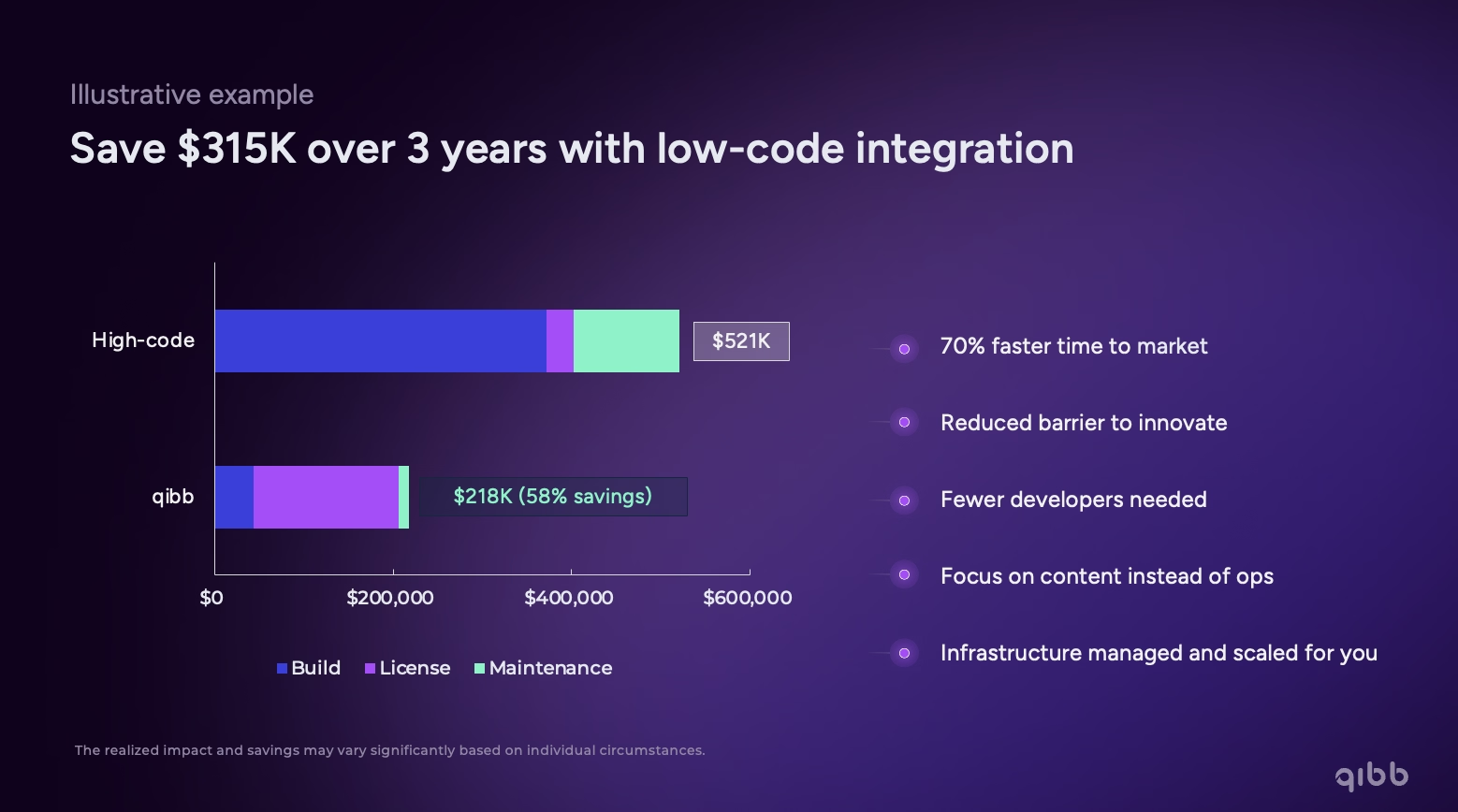
Custom development can become expensive quickly. Teams are not only paying for the initial build. They also need to maintain integrations, update APIs, troubleshoot issues, document logic, and adapt workflows as requirements change.
Low-code reduces that burden.
Instead of building every integration or workflow from scratch, teams can use visual tools, reusable components, prebuilt templates, and media-specific connectors. Developers can still add JavaScript or custom logic when needed, but they do not need to start from a blank page every time.
For media organisations, this means less repetitive integration work, fewer maintenance bottlenecks, and more time spent improving the actual workflow.
2. Empower your team
High-code workflows often depend on individual developers who understand the scripts, logic, and exceptions behind the scenes. That creates risk. When knowledge sits with a few specialists, workflows become harder to manage, troubleshoot, and improve.
Low-code makes workflow logic easier to see and share.
With qibb, teams can build workflows visually while still using code when needed. Developers keep the flexibility they expect, while operations, engineering, and editorial teams gain a clearer understanding of how processes move across systems.
The result is not less technical capability. It is better collaboration between technical and operational teams
3. Accelerate innovation
Media teams are constantly testing new tools, formats, distribution channels, and AI services. But innovation slows down when every experiment requires a full development cycle.
Low-code helps teams prototype, adapt, and scale workflows faster.
For example, a team might want to test a new AI metadata service, connect it to a MAM, route generated tags for review, and use approved metadata in publishing workflows. With qibb, teams can connect those systems inside one workflow instead of building isolated integrations around each tool.
That makes low-code especially useful for AI media workflows, where the value of AI depends on how well it connects to the rest of the media supply chain.
4. Ensure security and scalability
Enterprise media workflows need more than quick automation. They need access control, governance, deployment flexibility, monitoring, and the ability to scale across cloud, on-prem, and hybrid environments.
Generic no-code tools may not provide the operational control required for production media workflows. Custom development can provide control, but it often creates fragmented implementations that are harder to standardise across teams and environments.
Low-code orchestration gives teams the speed of visual workflow development with the operational control required for enterprise media operations.
With qibb, teams can standardise how workflows are built, reuse components, manage access, and deploy across different environments. This helps reduce technical debt while keeping workflows flexible enough to evolve.
5. Simplify development
Media workflows often connect many specialised systems: MAMs, DAMs, AI tools, QC platforms, playout systems, cloud storage, archive systems, and publishing destinations.
Without a workflow orchestration layer, teams can end up managing scattered scripts, fragile point-to-point integrations, or manual handoffs between tools.
Low-code helps simplify that complexity.
With qibb, teams can design connected workflows visually, reuse existing integrations, and add custom logic only where it is needed. This makes workflows easier to build, easier to monitor, and easier to maintain over time.
It also gives teams a clearer view of what happens after a workflow starts: which step ran, where something failed, what is waiting for approval, and what should happen next.
Low-code vs no-code vs custom development
No-code is useful when teams need simple automations and speed matters more than flexibility.
Custom development is useful when requirements are highly specific and teams need full control over every technical detail.
Low-code is the stronger fit when teams need both speed and control. That is usually the case in media workflows, where processes are connected, systems are specialised, and requirements change frequently.
Why qibb is built for low-code media workflow orchestration
qibb is a low-code media workflow orchestration platform built for the complexity of modern media operations.
It helps teams connect media systems, automate repeatable work, and orchestrate workflows across the media supply chain. Teams can build visually, use prebuilt media-specific integrations, add custom JavaScript where needed, and manage workflows across cloud, on-prem, or hybrid environments.
That makes qibb a strong fit for teams that have outgrown simple no-code automation but do not want to rely on custom development for every workflow change.
Whether teams are integrating AI services, modernising legacy middleware, connecting MAM and archive systems, automating publishing workflows, or improving operational visibility, qibb gives them a faster and more flexible way to build.
Final takeaway
Media workflows need to move quickly, but they also need control.
No-code tools can be too limited. Custom development can be too slow and expensive to maintain. Low-code gives media teams the middle ground: visual workflow building, technical flexibility, reusable integrations, and the ability to adapt as requirements change.
For media organizations that need to connect, automate, and scale complex workflows, low-code orchestration is often the most practical path forward.

qibb today


What is a media iPaaS, and why do media teams need more than generic integration tools?

Media workflow automation vs orchestration: what’s the difference and why it matters
How media teams can measure sponsorship value from live event footage
Five questions every media architect should ask before adding another tool
How policy automation prevents workflow failures in media operations
From elections to major sports events: how orchestration helps newsrooms stay ahead during live events
How media teams can add new AI tools without breaking their workflows
How agentic workflows change the game for overstretched media operations in sports
IBC 2025 proves it: AI works, but workflows hold it back
Low-code, no-code, or custom development: what works best for your media workflows?
How a European broadcaster saved over €80,000 in one year with qibb’s media workflow orchestration platform